

AirBuddy
by Dipendu Saha
Share your photos, video & music with your friends and family on big screen TV

AirBuddy
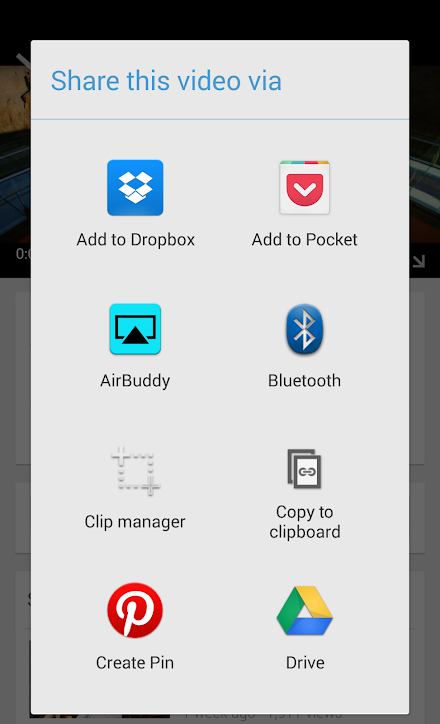
AirBuddy adds AirPlay feature to any Android device.
All Android devices including Phone, Tablet, Android TV, Google TV devices are supported.** Please Note (9/17/2015): AirPlay from iOS 9 devices is not supported yet - an updated version with iOS 9 support is coming soon, please stay tuned.** Play Video, Photo, Music using AiBuddy -• Play On your Android device from an iPhone, iPad, iPod Touch or any other AirPlay client - Play Video, photo and music - Play Youtube videos• Play On your Android device from an AirBuddy on a different Android device - Play Video and photo - Play Youtube videos• Play from your Android device to another Android device with AirBuddy, Apple TV or any other AirPlay server - Play YouTube videos and other MP4 videos - Play Photos from Gallery, Photos, Facebook apps and other Android apps* See Limitations section for unsupported scenarios.If you run into any issues, please contact me ([email protected]) - Ill be happy to help.
Visit AirBuddy App Website: http://www.airbuddyapp.com This free version limits continuous playback to 15 minutes/15 photos.
Please upgrade to remove this limitation.For details on use of the permissions, please refer to the bottom of this description text.** Please Note (Update 9/30/2014): - If you are sending videos from iOS devices with Latest Youtube app, please see here - http://www.airbuddyapp.com/#current-known-issues For playback to AirBuddy, source of content can be any of the following -• iOS device (iPhone, iPad, iPod Touch)• Another Android device with AirBuddy app installed it - AirBuddy can act as an Airplay Client/Remote• Another Android device with any other Airplay client app installed• iTunes on PC/Mac Limitations:Following special scenarios are not supported.• Airplay Mirroring• DRM protected movie playback (e.g.
most movies purchased in iTunes)• Airplay from Netflix App (this was added in Netflix app v5.0 for iOS 7)• Sending Music/Audio from other Android Apps • Sending Music/Audio to AirTunes target devices (AirPlay speakers, some of the Amp systems etc.) ** Permissions:Storage - Send pictures stored in SD Card and USBrun at startup - Starts AirPlay Server to keep it running in backgroundprevent device from sleeping - Keeps screen on only while playing video locallyallow Wi-Fi Multicast reception - Wifi-Multicast reception is required for AirPlayfind accounts on the device - Used for license verificationVersion 2.6- Add support for Audio playback from iOS9 devices (Work in progress for a fix for Video/Photo playback with iOS9)- Add option to keep playing video even when client device disconnects (client screen locks etc.)Older Versions- Support sending content to password protected AirPlay devices - Steam Photos to another AirBuddy or Apple TV - Photos shared from Photos, Facebook, G Drive, Dropbox, other apps & external media
About AirBuddy
- Package name (App ID)
- com.akadilabs.airbuddy
- Available on
- Google Play
- Price
- Free
- Version
- v2.6
- Updated
- October 22, 2015
- Developer
- Dipendu Saha
Looking for the AirBuddy APK?
The safest way to get AirBuddy (com.akadilabs.airbuddy) on your Android device is to install it directly from Google Play — you'll always get the latest official version, automatic updates, and no risk of modified or infected APK files from third-party sites.

Music Features
Enjoy high-quality music streaming and playback features.
Social Features
Connect and share with friends and the community.
Gaming Features
Enjoy immersive gaming experience with various game modes.
See AirBuddy in Action


What Our Users Say
Don't just take our word for it. Here's what our users have to say about this Android app.
"Um I can now send picture to my brother and my mother!!"
"It's a very bad app does not work at all"
"I just want an app that can send pictures to my Apple TV. This does not do that. This doesn't connect to my Apple TV at all."
"This is screen reciever.. It is one of the best ! Works in all the android smart devices such are phones ,tablets,smart projectors ...displays screens of high resolution above FHD resolution ..but that depend on the resolution of the device this is been installed ..I love it ..is very good tool"
"Paid for full version but it still asks me to buy it on my android tv. Cuts off all the time"
"Tried it. Didn't work. Paid to upgrade. Still didn't work. Do not download this app. Waste of time and money."
"DOESN'T WORK TAKES FOR EVER TO LOAD ಠ_ಠ"
"Does exactly what it says works a charm on my zgemma."
"The problem here u can only cast video from YouTube with disconnection problems every 2 minutes and not from Google online like web video cast or tubio app. Both this two are perfect. I bought this app also and I feel sorry for that"
"bullshit app"
Frequently Asked Questions
Is AirBuddy free?
Yes, AirBuddy is free to download and install on Android through Google Play.
How do I install AirBuddy on Android?
Open Google Play on your Android phone or tablet, search for AirBuddy by Dipendu Saha or tap the Google Play button on this page, then tap Install. The app downloads and installs automatically.
What is com.akadilabs.airbuddy?
com.akadilabs.airbuddy is the App ID (package name) of AirBuddy on Google Play. Every Android app has a unique package name, and it is the safest way to verify you are installing the official app.
Is AirBuddy safe to download?
Installing AirBuddy from Google Play is the safest option: you get the official version published by Dipendu Saha, verified by Google Play Protect, with automatic updates. Avoid APK files from unofficial third-party sites.
Get AirBuddy Today
AirBuddy for Android — free download on Google Play.
Compatible with Android phones and tablets — available on Google Play.
Ask AI about this app
Get instant answers about features, tips and more from popular AI assistants.